OC-05 — Design System & Creative Direction
OceanCanvas — Dashboard & Visualization Design Direction
April 2026 · v1.0
This document captures the visual language, editorial design philosophy, and all surface designs for OceanCanvas. It documents three fully-designed dashboard views, the recipe editor studio, the gallery front page, and the video editor — each with screenshots.
Design philosophy — editorial quality
The central design decision is to treat OceanCanvas's data visualizations as editorial design rather than dashboard design. The reference is Wired magazine at the intersection of technology and art — specifically its Infoporn data visualization tradition where a single data point, given the design it deserves, becomes the story.
What editorial means in practice
| Principle | Description |
|---|---|
| The number is the headline | One dominant data point — large, confident, unboxed — anchors each view. 14.2°C for SST. +20.4cm for sea level. Not a KPI card in a grid. The number owns its space the way a magazine cover headline does. |
| The visualization is the image | The ocean heatmap or the sea level curve is not a chart embedded in a page — it IS the page. No chart border, no white background, no legend box cluttering the field. |
| Color is a statement | Each source has its own palette derived from physical meaning. SST uses thermal (blue→green→amber→red). Sea level uses teal. Chlorophyll uses green. The color shift between views is like turning to a different section of the magazine. |
| White space is intentional | Not everything is packed in. The layout breathes. Key numbers are given room. |
| Each source has its own editorial voice | Not a color change — a different layout logic. The data dictates the form. |
| Art potential is documented | Each source view includes an 'art potential' section explaining what that data wants to become as generative art. |
Dashboard — View 1: Main overview
The primary entry point. A full-bleed ocean data visualization with source navigation, contextual stats, and a historical timeline scrubber.
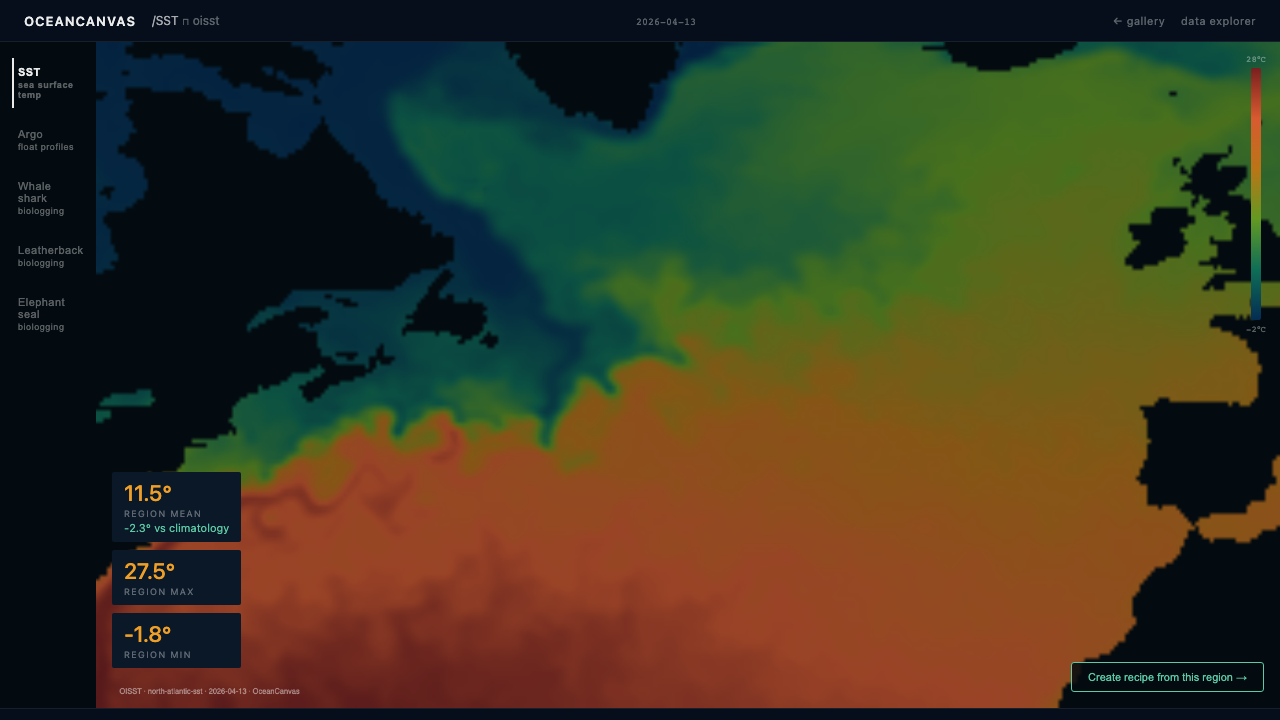 Fig 1. Main dashboard — SST view active. North Atlantic sea surface temperature, NOAA OISST. Left rail: source navigation. Stats overlay: region mean, max, anomaly. Bottom: 1981–2026 timeline scrubber + mini time series.
Layout structure
| Region | Size | Description |
|---|---|---|
| Topbar | 42px | Wordmark · active source name · UTC timestamp · mode controls |
| Left rail | 96px | Source navigation as minimal type labels. Active source marked with source-accent text colour (no border, no background fill). |
| Map canvas | Full bleed | Ocean data rendered as GPU-accelerated color field via deck.gl BitmapLayer. Grid lines at 10° intervals at 8% opacity. |
| Stats overlay | Floating | Three floating stat cards with dark translucent backdrop. Numbers at 22px, labels at 9px spaced caps. |
| Legend strip | 10px wide | Thin colour bar with 4 value labels. No border, no box. |
| Timeline | 52px full width | 1981 → 2026 scrubber. Click or drag to navigate historical record. |
| Mini time series | 64px full width | Active source regional mean, monthly, full record. |
Dashboard — View 2: SST editorial spread
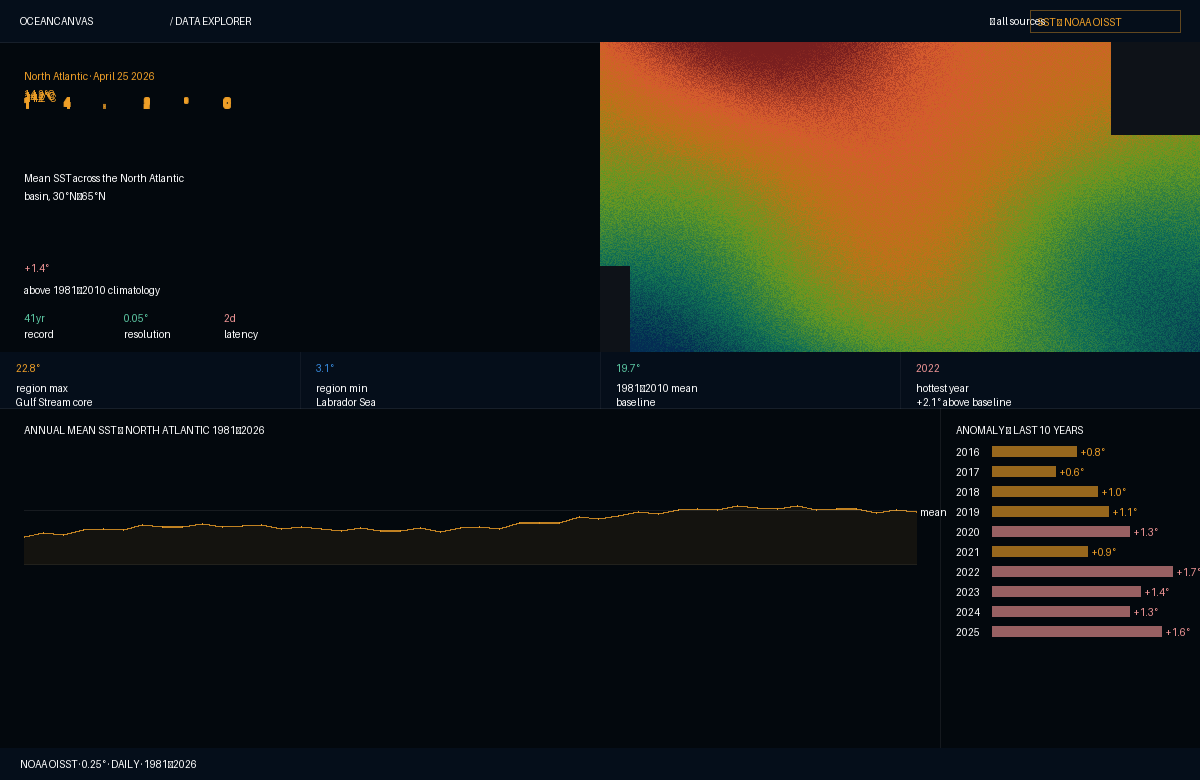 Fig 2. SST editorial spread. Left: hero number (14.2°C at display size) + contextual stats + metadata. Right: North Atlantic SST thermal heatmap. Below: 1981–2026 annual trend chart + 10-year anomaly bar chart.
Composition decisions
| Element | Description |
|---|---|
| Hero number at display scale | 14.2°C rendered at ~72px. Not in a card. Not labeled 'current SST'. The number owns the upper-left quadrant. |
| The anomaly as story | +1.4°C above climatology in coral/red — this is the data point that matters, foregrounded over the raw temperature. |
| Two-column hero | Left: number + context + metadata row. Right: the ocean heatmap. Vertical divider line at 0.5px. |
| Data strip (4 columns) | Region max · region min · 1981–2010 mean · hottest year. No backgrounds, no borders on cells. |
| Trend chart (left body) | 45 years of annual mean SST. Area fill at 7% opacity. Climatology baseline as dashed line. Chart drawn on dark canvas — no chart border. |
| Anomaly bars (right panel) | 10-year bar chart. Bars gradient from amber to coral as anomalies exceed 1.2°C. |
Dashboard — View 3: Sea level editorial spread
The sea level spread demonstrates the editorial voice at its most forceful. The 30-year satellite altimetry record occupies the entire hero zone, full width, 280px tall.
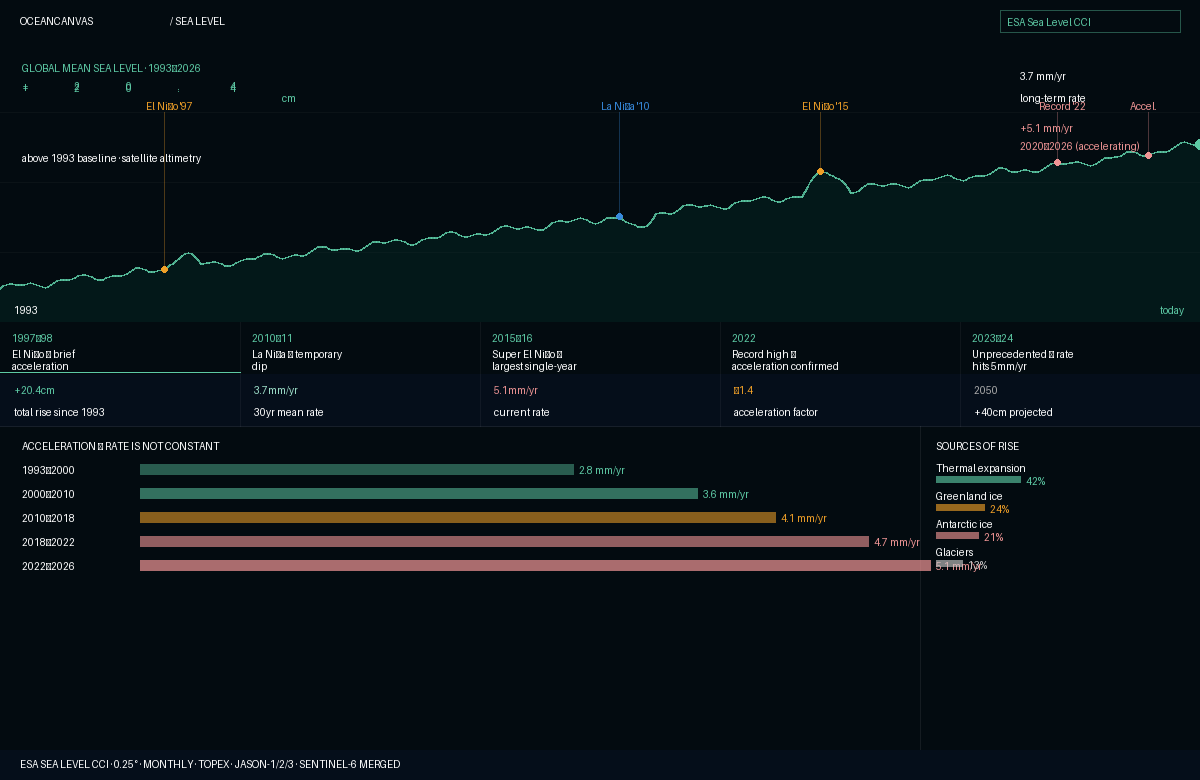 Fig 3. Sea level editorial spread. Hero: full-width 30-year rise curve (1993–2026), teal on dark canvas. Numbers float over the hero: +20.4cm total rise, 3.7mm/yr mean rate, +5.1mm/yr current rate. Below: events strip, acceleration chart, sources of rise.
Why this layout works
The sea level dataset has one dominant story: the ocean is rising, and it is rising faster. Every layout decision serves that story. The curve is not a chart — it is a landscape.
| Element | Description |
|---|---|
| The curve as full-width hero | The rising line spans the entire width at 280px tall. 1993 on the left edge, 'today' on the right. Key events annotated directly on the curve. |
| Numbers floating over the curve | +20.4cm at large scale top-left. 3.7mm/yr mean rate top-right. +5.1mm/yr current rate in coral below it — visually alarming. |
| Events strip (5 columns) | 1997-98 El Niño, 2010-11 La Niña, 2015-16 super El Niño, 2022 record, 2023-24 acceleration. Click to highlight on the curve. |
| Acceleration chart | Bar chart showing mean rate across five periods, bars growing longer and graduating from teal to amber to coral. |
| Sources of rise | Thermal expansion 42%, Greenland ice 24%, Antarctic ice 21%, glaciers 13%. Horizontal progress bars. |
Recipe editor studio
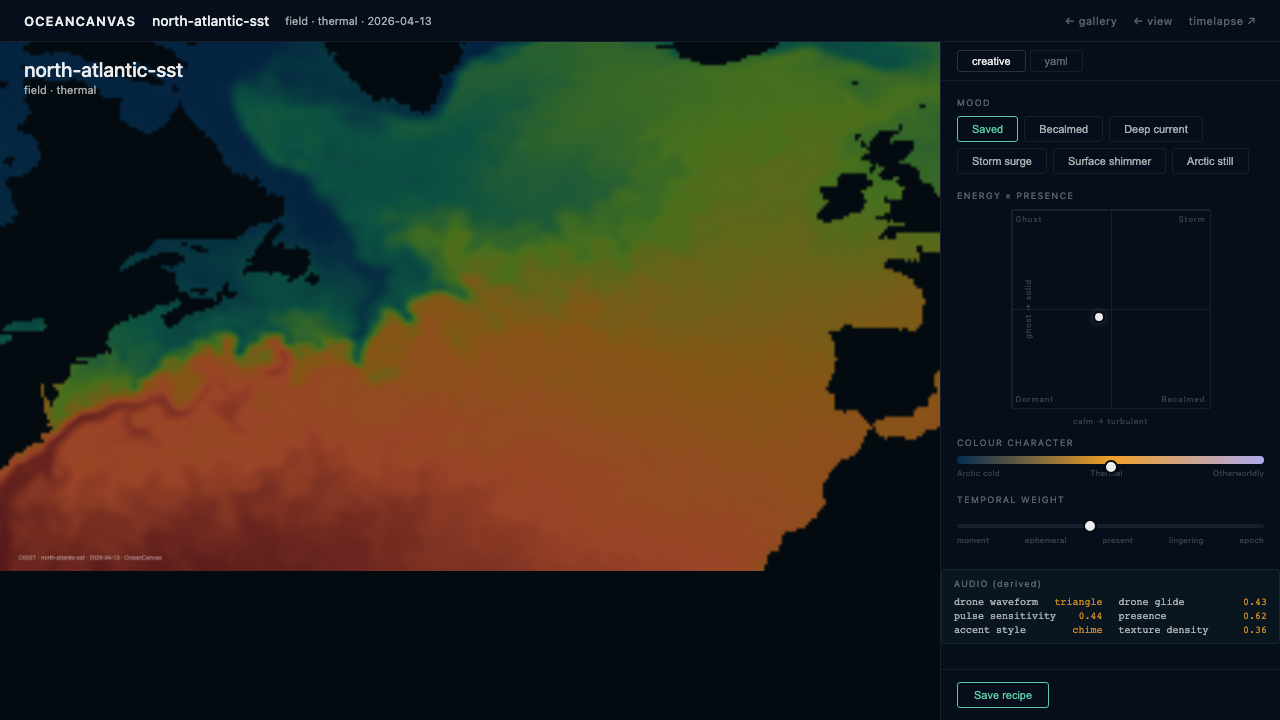 Fig 4. Recipe editor — creative mode. The live preview (today's actual ocean data rendered in real time) occupies the full width above the flip toggle. Below: mood presets, energy × presence 2D space, colour character spectrum, temporal weight.
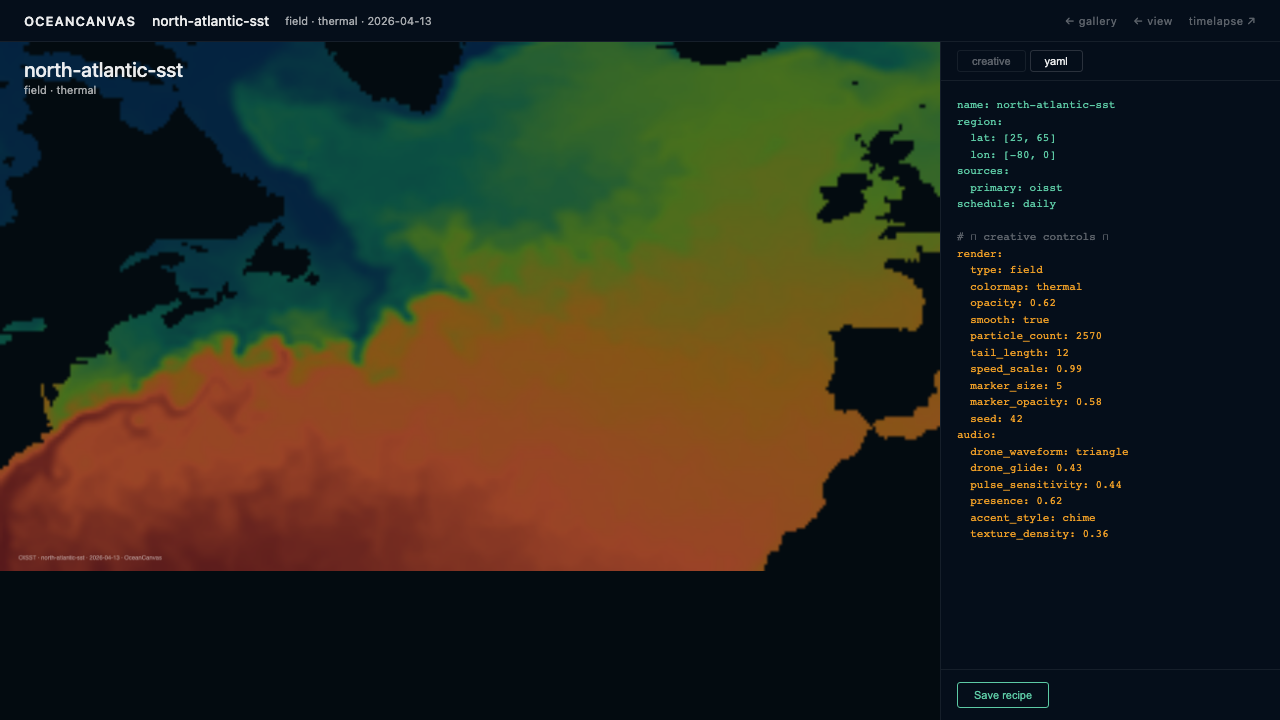 Fig 5. Recipe editor — YAML mode. Same preview, same flip toggle. Creative controls replaced by recipe YAML. Amber lines are the creative choices. Blue lines are structure and source definitions.
The design philosophy: the interface operates at the level of artistic intent, not technical parameters. The user thinks in terms of mood and character. Technical parameters are generated output, not user input.
The flip
One preview canvas (always visible, runs live p5.js sketch with real data). Mode toggle below switches between:
- Creative mode: mood presets, energy×presence 2D Cartesian space, colour character spectrum, temporal weight
- YAML mode: generated recipe YAML with amber-highlighted lines showing creative choices — editable, bidirectional sync
Sketch editor ↗ is a link out, not a mode flip — opens raw p5.js code editor with the payload pre-loaded. Escape hatch for the 10% of pieces that push beyond the system.
Gallery front page
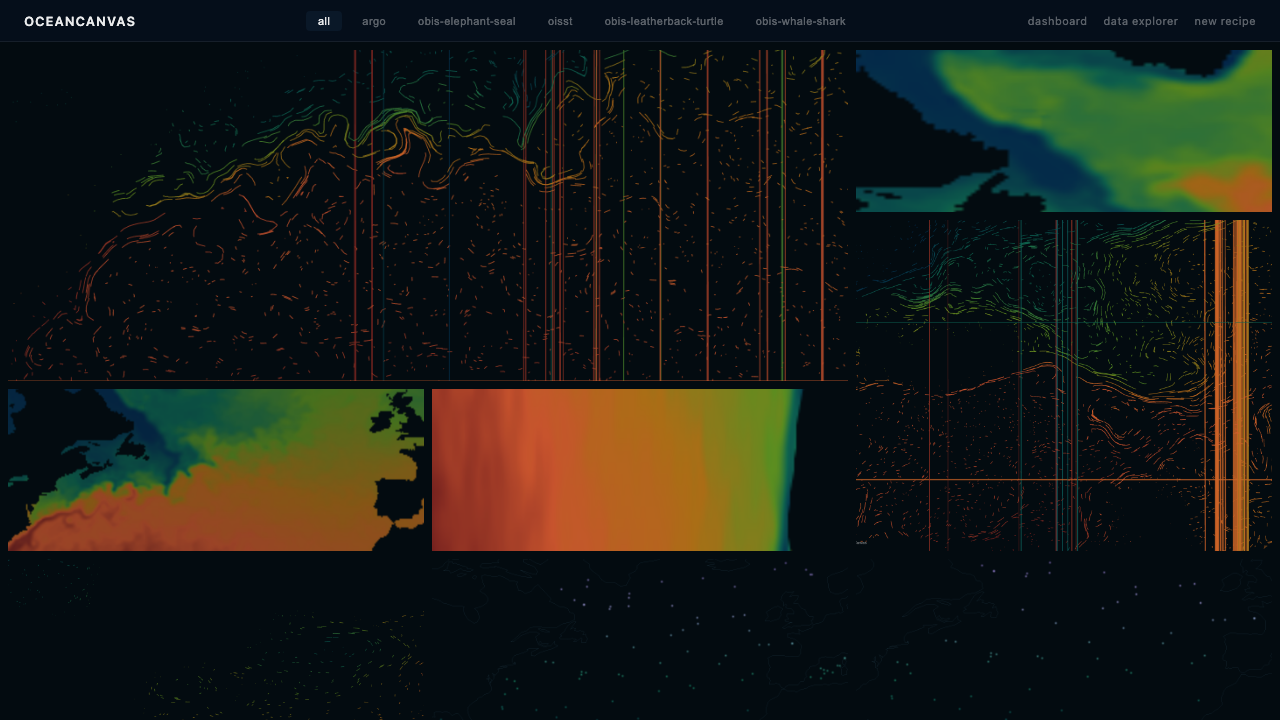 Fig 6. Gallery front page. Nav with wordmark and source type filters. Hero: today's featured render, full-bleed. Strip: the last 14 renders of that recipe. Grid: all recipes today, source palettes visible.
Layout structure
| Section | Description |
|---|---|
| Nav | Wordmark + source type filters (all · SST · salinity · sea level · ice). 'Updated daily' badge. |
| Hero | The featured recipe's latest render, full-bleed. Actions: timelapse ↗ · recipe ↗ · download. Changes every day. |
| 14-day strip | The same recipe's last 14 renders. The ocean's recent history visible at a glance. |
| All recipes grid | Every recipe rendered today, 3-column grid. Source palettes make the grid visually rich without labels. |
The gallery is never static. The pipeline runs daily at 06:00 UTC. No manual curation needed.
Video editor
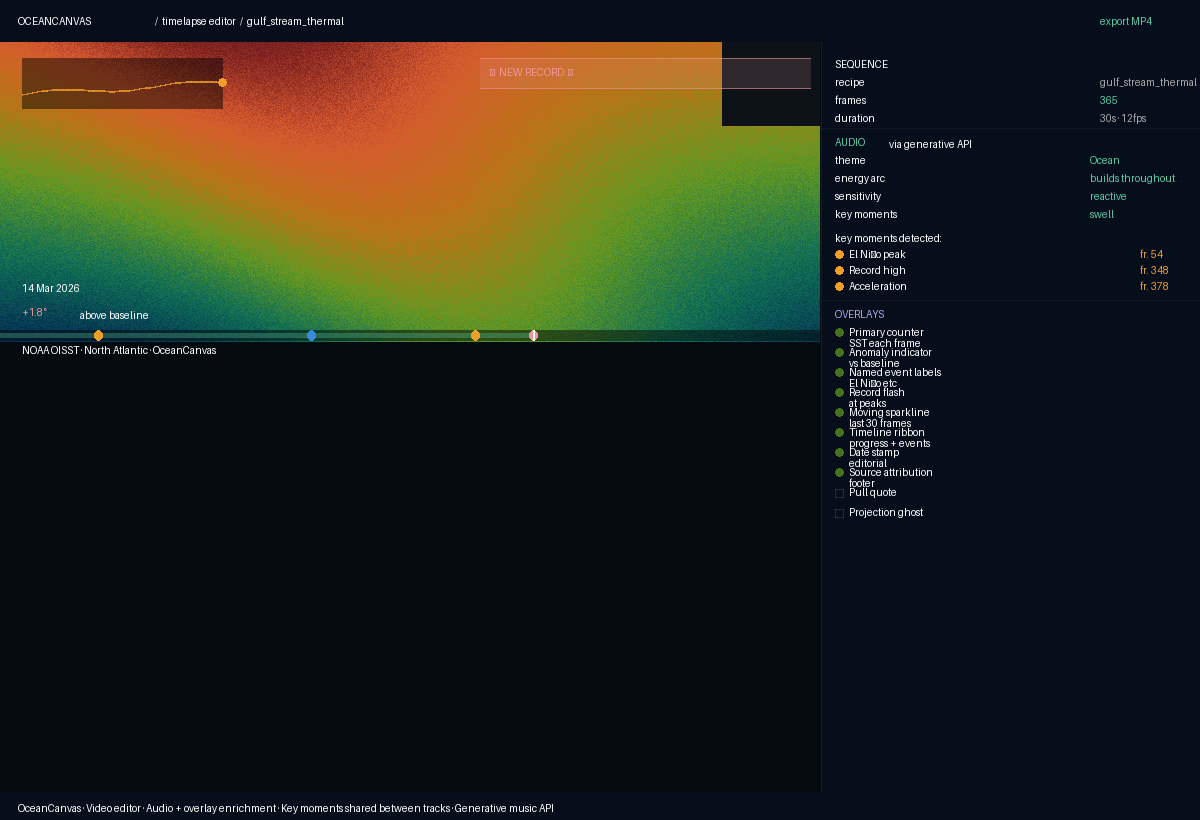 Fig 7. Video editor. Left: full-width preview with data overlays visible. Right panel: Sequence, Audio (via generative API), Overlays (toggle list). Audio and overlay key moments shared and synced.
The video editor is assembly and enrichment — the creative decisions are already made in the recipe. Three enrichment tracks, all optional, all sharing the same key moment detection algorithm.
Colour system
Base
| Token | Value | Usage |
|---|---|---|
canvas |
#030B10 |
Base background — all surfaces |
surface |
#050E1A |
Raised panels, topbar |
elevated |
#0A1828 |
Modals, dropdowns |
overlay |
rgba(3,11,16,0.85) |
Stats overlays on maps |
Source domain palettes
| Source | Palette | UI accent |
|---|---|---|
| SST (thermal) | #042C53 → #0F6E56 → #639922 → #BA7517 → #D85A30 → #791F1F |
#EF9F27 |
| Sea level | #04342C → #1D9E75 |
#5DCAA5 |
| Salinity | #185FA5 → #5DCAA5 |
#5DCAA5 |
| Sea ice | deep navy → purple → lavender → near-white | #AFA9EC |
| Chlorophyll | deep blue → bright green | #97C459 |
| Argo | dark blue → teal → lavender → purple | #AFA9EC |
Intent tokens
| Token | Value | Usage |
|---|---|---|
intent-alert |
#F09595 |
Positive anomalies, warming trends, acceleration — never decorative |
intent-success |
#5DCAA5 |
Confirmed, active states |
intent-warning |
#EF9F27 |
Caution, pending |
Typography
| Scale | Size | Weight | Usage |
|---|---|---|---|
display |
72–80px | 500 | Hero data points (14.2°C, +20.4cm) |
hero |
48–56px | 500 | Large stats |
xl |
28–32px | 500 | Sub-hero numbers |
lg |
18–22px | 500 | Secondary stats |
base |
14–16px | 400 | Body, descriptions |
sm |
11–12px | 400 | Supporting text |
label |
9–10px | 500 | Section labels — SPACED CAPS, letter-spacing 0.14em |
mono |
10px | 400 | Coordinates, YAML, code |
Layout principles
- Dark canvas everywhere — data always renders on dark. Never a white chart background.
- 0.5px dividers — internal structure created by hairline rules, never by background fills.
- No decorative borders — borders only where they separate distinct content areas.
- Numbers float over data — stat overlays use translucent dark backdrops, not opaque cards.
- Full bleed — hero elements extend to the container edge. No padding on primary visualizations.
- Intentional typography scale — two or three sizes per view, clearly hierarchical.
Implementation stack
| Tool | Purpose |
|---|---|
| deck.gl | All ocean field rendering via WebGL. BitmapLayer for raster tiles, ScatterplotLayer for points. |
| MapLibre GL JS | Geographic context: coastlines, lat/lon grid, place labels. Free tiles (OpenFreeMap or CARTO dark matter). |
| Observable Plot | Time series, trend charts, anomaly bars, acceleration charts. SVG-based. |
| React | Component composition. State model: active source, active date, selected region. |
What was explicitly not chosen
| Tool | Reason |
|---|---|
| Raw D3.js | Observable Plot gives 90% of D3's power in 10% of the code |
| Leaflet | SVG-based data layers cannot handle ocean grid resolutions |
| CesiumJS / 3D globe | 3D globes hide data behind the sphere; 2D projections are clearer |
| Python dashboards (Bokeh, Streamlit) | Require a Python server to stay running; the gallery is a static React site |
| Chart.js | Consumer-app aesthetics — cannot meet OceanCanvas's visual quality bar |
Design principles to protect
- Never add a white chart background. If a chart needs a background, reconsider the layout.
- Never box a hero number. The number lives in space.
- The art potential section stays in every source editorial spread — it is not optional.
- Each new source must establish its own editorial voice, not inherit the SST layout.
- The colour palette per source must be derived from physical meaning, not aesthetic preference.
OceanCanvas · OC-05 Design System & Creative Direction · v1.0 · April 2026